



Request failed with status code 500
📢
Flat 40% OFFfor the first 100 customers!Fill out the form below & get your discount code via email.Hurry, don't miss the chance!
contact with Vast Edge

SAP HANA Database Backup, Report & Restore

Talk to an Expert

Trusted by Global Brands

HHI
Art
Act
Natura
quorum
ForeScout
Cokeva
BioMarin
christie
Upwork
Mother
Walmart

As per IDC, Forrester and other research groups, continuous full and incremental data backups is a must to attain few seconds of RPO and under 10 minutes RTO. To mitigate risks due to unforeseen circumstances or human/machine errors, the first task across all environments (poc, dev, qa, & prod) must be to back up both code and operational data. With SAP HANA being a cornerstone of many organizations' data infrastructure, reliable backup mechanisms are essential to protect against data loss and ensure business continuity. In addition to backup and restore, data backups are being leveraged by several small and large organizations for reporting and audit trail purposes.
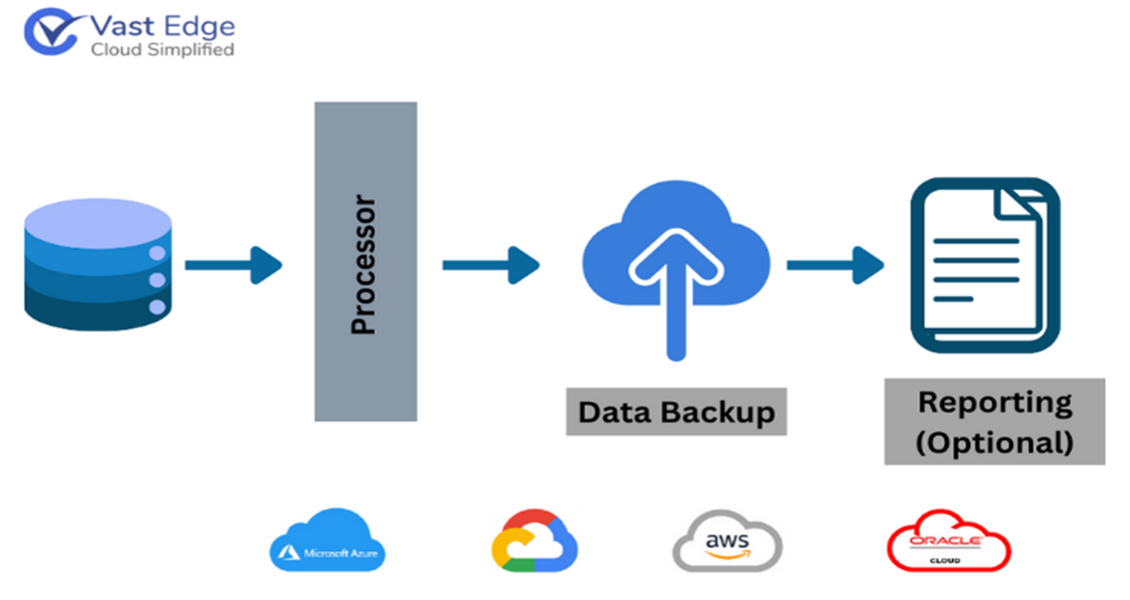
Vast Edge Backup Solution for SAP HANA

Vast Edge offers robust SAP HANA backup solutions to ensure the safety and integrity of customer’s critical data. Vast Edge employs advanced backup strategies tailored to the specific needs of SAP HANA environments, leveraging technologies such as snapshot-based backups, log backups, and automated backup scheduling. Our expert team designs comprehensive backup and recovery plans that consider factors like data volume, retention policies and compliance requirements (encryption in transit and at rest)

File-based vs. Backint: which is better for SAP HANA?

File-based backups are simple to set up and suitable for smaller environments, while Backint is better for enterprise use as it integrates with third-party tools, offering scalability, automation, and centralized management.

The Need for Data Backup

Leading Fortune 500 companies like Microsoft, Home Depot, JPMorgan Chase, Facebook, and Target have also fallen victim to some of the most significant data breaches in history. This highlights a widespread vulnerability across the corporate landscape, where virtually no large entity has remained untouched.
Over the past decade, the repercussions of inadequate cybersecurity measures have reverberated throughout the business world, resulting in staggering financial losses amounting to billions of dollars.
Moreover, these breaches have left consumers exposed to the risk of financial crimes, underscoring the urgent need for enhanced security protocols and proactive measures to safeguard sensitive data.

How to reduce SAP HANA backup time for large databases?

You can reduce backup time by enabling parallel backups, using high-performance storage, applying compression, and scheduling backups during low system usage to improve efficiency.

By partnering with Vast Edge for SAP HANA backup, businesses can mitigate risks, safeguard their data assets, and maintain uninterrupted operations, even in the face of unforeseen challenges or disasters.

SAP HANA ARCHITECTURE


SAP HANA employs an innovative in-memory computing architecture, enabling lightning-fast data processing and real-time analytics.

image

Why is my SAP HANA log backup not truncating?

This usually happens due to misconfigured log backup settings, disabled scheduling, or issues with the backup destination. It can also occur if log backups are not completing successfully or if the system is still retaining logs for recovery purposes.

What are the SAP HANA backup requirements for GDPR?


GDPR requires secure storage, encryption, controlled access, and defined retention policies for backups. Regular testing and audit readiness are also important to ensure data protection compliance.

How to encrypt SAP HANA backups at rest?

SAP HANA provides native encryption features to secure backups at rest. You can enable encryption in the system settings or use external tools for additional security and compliance requirements.

Vast Edge offers a complimentary demo environment to test our solution. If you're interested in experiencing our demo, please schedule a meeting with one of our Vast Edge experts by clicking on this Microsoft Booking link. This 20-minute session will feature a live demonstration of our Vast Edge SAP HANA backup solution. Upon request, our personnel will provide personalized login credentials for accessing the demo environment.

FAQs

Frequently asked questions

Q1. How to backup SAP HANA?

SAP HANA backups can be taken using SAP HANA Studio, Cockpit, or SQL commands. You can perform full data backups, log backups, and configuration backups. These can be scheduled or triggered manually and stored on disk or external storage.

Q2. What are the types of backup in SAP HANA?

The main types are Data Backup, Log Backup, and Configuration Backup. Data backups capture the full database, log backups record changes for recovery, and configuration backups store system settings.

Q3. What are the 4 types of data backup?

The four common types are Full Backup, Incremental Backup, Differential Backup, and Transaction Log Backup. Each varies based on how much data is copied and how recovery is performed.

Q4. What is the backup strategy of SAP HANA?

An SAP HANA backup strategy typically includes regular full data backups combined with frequent log backups. It ensures point-in-time recovery, minimal data loss, and compliance with retention policies.

Q5. How to take SAP HANA backup?

You can take a backup via SAP HANA Studio/Cockpit by selecting the system and choosing “Backup Now,” or by running SQL commands like BACKUP DATA. Ensure proper storage location and monitoring for successful completion.

Q6. Can I run an SAP HANA backup while the database is online?

Yes. SAP HANA supports online backups, meaning you can perform a full, incremental, or differential backup without interrupting business operations or disconnecting users. The database remains fully functional during the process.

Q7. How do I limit the size of SAP HANA backup files?

You can use the parallel_data_backup_backint_channels parameter to split backups into smaller parts. For file-based backups, the max_file_size parameter in the global.ini file allows you to define a threshold (in GB) to prevent single files from becoming too large for the file system.

Q8. What happens if a scheduled SAP HANA backup starts before the previous one finishes?

SAP HANA does not allow two data backups to run simultaneously on the same service. If a second backup is triggered, it will fail with an error message, while the first backup continues to completion.

Blogs

Difference Between SAP HANA and SAP ABAP
SAP HANA
Nov 6 2024
5 min read

Difference Between SAP HANA and SAP ABAP

SAP is a leader in enterprise software, providing businesses with tools to streamline operations and enhance decision-making...

Vik
Read More
NetSuite vs SAP HANA ERP: A Comprehensive Comparison Guide (2024)
SAP HANA
Sep 16 2024
5 min read

NetSuite vs SAP HANA ERP: A Comprehensive Comparison Guide (2024)

In today's competitive business landscape, organizations are increasingly seeking robust Enterprise Resource Planning (ERP) solutions...

Vik
Read More
10 Key Features of SAP HANA for Business Performance: What You Need to Know
SAP HANA
Aug 26, 2024
5 min read

10 Key Features of SAP HANA for Business Performance: What You Need to Know

In today’s fast-paced business environment, organizations need robust, real-time data processing capabilities to stay competitive...

Vik
Read More

Your Vision, Our Expertise

Elevating Your Software Product Engineering Journey with Vast Edge

Request failed with status code 500

ABOUT VAST EDGE

For more than two decades, Vast Edge has served Fortune 500 enterprises across finance, manufacturing, telecom, and healthcare. Our expertise in AI driven migration, analytics, and security enables these organizations to scale with confidence while meeting the highest compliance standards.
We partner closely with CIOs, architects, and transformation teams to design hybrid environments that unify legacy systems with cloud-native AI services.

QUICK LINKS

TECHNOLOGY PARTNERS

CONTACT US

Copyrights © April 21 , 2026 All Rights Reserved by Vast Edge Inc.